
Skip to content
Home

Digital parking workflows

Digital parking permit management: beyond Excel and email

Supa Parking is cloud software for managing parking permits and subscriptions for municipalities and parking operators. It provides an operational alternative to Excel registers, email applications and printed lists, connecting applications, holders, plates, zones, expiry dates and checks in an integrated parking management platform.
Request a demo

The same tasks, a different way of working

CriterionEmail, Excel and paperSupa Parking
Collecting applicationsFind emails and attachments in conversations, then enter details in the permit register where needed.Applicants submit required details and documents through the portal; staff manage requests through the configured approval workflow.
Following application statusReconstruct status from messages, notes and manual spreadsheet updates.Application, review and any payment follow the enabled process before a permit is issued.
Keeping permits updatedMaintain consistent plates, zones and expiry dates in rows; separate copies may need reconciliation.The holder, plate, zone and validity are linked to the permit in the platform, with role-based access.
Renewals and expiry datesFilter expiry lists, prepare messages and update the register after renewal.Online consultation and renewal where enabled, with reminders and messages to permit holders.
Checking a plateConsult a printed list or file and update it after issuance, changes and renewals.Authorised operators check plates on a phone or tablet against zone and validity.
Delegating to schools, companies and hotelsSend lists and requests to the operator, who transfers changes into the central records.With Supa Parking Desk, partners manage permits within assigned quotas, tariffs and periods.
Following up a faultConnect calls and emails to the device and share progress between staff.Supa Parking Helpdesk links reports, devices and areas, with priorities, notifications and work statuses.

This compares common workflows, not absolute limitations of email or spreadsheets. Benefits depend on volumes, organisation, data quality and enabled services; no measured savings are promised.

Email or portal: following an application

Email remains useful for contact with residents and customers. A portal adds a dedicated path to collect details and documents and handle applications and renewals under service rules. Staff can follow the application in the system instead of reconstructing each step from a conversation.

Explore the permit portal

Excel or software: connecting records to daily work

Excel is useful for lists, analysis and preparing data. When several people issue, update and check permits, a platform connects records to operational tasks: holder, plate, zone, validity and access roles. Assess the benefit against the manual steps your team carries out today.

Explore permit management

Example: renewing a resident permit

In a manual workflow, a resident sends an email, staff check details, update the spreadsheet and share the list with enforcement. In the enabled digital workflow, the resident starts the renewal in the portal. After the required checks and any payment, operators can consult the updated validity in the system. Approval steps remain those set by the municipality.

See the resident workflow

Connecting office staff, field teams and partners

Information can follow the work: authorised colleagues consult records relevant to their roles, field teams check plates and delegated organisations work within central rules. Payments, meters and external systems require compatible interfaces and project-specific configuration.

Explore the integrated platform

Start with one process

We help you transfer existing data from other management systems or Excel spreadsheets to Supa Parking. We start with the data you can export and work with you to assess which information to retain, how to map it to platform fields and what to check after import.

Choose a concrete process such as resident applications or renewals. Gather spreadsheets, fields, permit types, zones and expiry dates; review duplicates, plates and data quality. Assess import feasibility and method before switching. Then configure roles, train staff and test application, issuance, renewal and checks.

Assess a switch

Measure the benefit in your operation

Compare periods before and after launch: time per application, status enquiries by email, repeated data entry and counter visits. Separate training time from normal operation and account for volume. Private operators can use the same approach for customer subscriptions and authorisations.

When should you move from Excel to parking permit software?

Assess a switch when several colleagues update the same permits, renewals require repeated entry or enforcement staff must wait for an updated list. Compare a complete application: submission, review, any payment, issuance, plate change and zone check. Supa Parking lets you assess these steps in one environment, configured for your service.

For municipalities, permit offices and enforcement teams

A municipality can organise resident permits, zones and tariffs, collect portal applications and retain the checks required by its rules. Authorised operators verify validity by plate. Connected records and role-based access support both office staff and field teams.

For parking operators and private facilities

Operators can organise subscriptions, customer authorisations and permits for businesses or accommodation providers. Supa Parking Desk lets delegated organisations work within assigned quotas, tariffs and validity periods. Supa Parking Helpdesk links fault reports to devices and parking areas. Choose the scope according to actual operational processes.

See the daily work in the product.

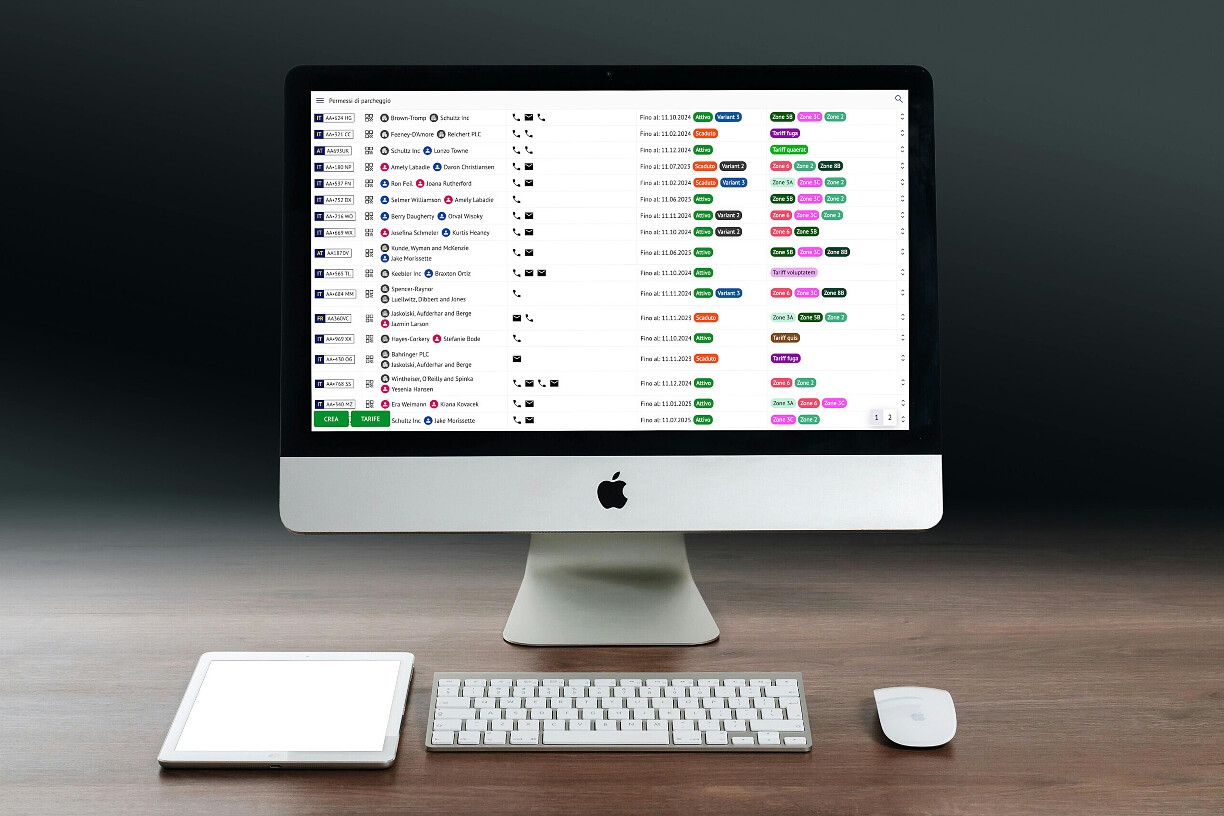
The operational view and user portal show both sides of the service: managing permits and applying for or renewing them.
The operator workspace
The portal for citizens and customers

FAQ

Must we stop using email and Excel?

No. They can remain useful for communication, analysis and data preparation. The platform centralises the operational processes you choose to digitise.

Can permits be imported from Excel?

We help you transfer existing data from other management systems or Excel spreadsheets to Supa Parking. We start with the data you can export and work with you to assess which information to retain, how to map it to platform fields and what to check after import.

The file, available fields, data quality and service rules must be reviewed. Import format, feasibility and work are defined for the project; direct upload of any spreadsheet is not guaranteed.

Are all applications approved automatically?

No. The municipality or operator decides which applications require review. Collecting information through a portal does not remove required approval steps.

How much time does digital management save?

It depends on volumes, procedures and enabled services. A demonstration using real cases can identify steps to reduce; savings must be measured in your own operation.

What software can replace Excel for parking permit management?

Supa Parking is an option for municipalities and operators that need to connect permits, plates, zones, expiry dates and checks. It includes a portal and configurable approval workflows; a demo using your cases helps assess whether it covers the required process.

Can the portal handle permit applications currently received by email?

Yes. Where services are enabled, residents and customers can submit details and documents through the portal. Staff follow the configured process, while email can remain a contact channel.

How is a municipal licence priced?

Supa Parking has one licence per municipality, broadly based on its size. Computers, staff accounts and devices can be added or removed without additional per-user or per-device licence charges. Services, integrations and implementation work are defined for the project.

Bring a real application. Explore the digital workflow with us.

Tell us about the areas you manage and the services you want to offer. We can explore a setup for your project together.

Request a demo